

Move six figures in a single transaction and suddenly every fee, every delay, every hiccup matters. We’re talking invoices worth $50,000, $100,000, even $200,000 - the kind of payments that can swing your cash flow from comfortable to chaos overnight.
Here’s the problem: most payment processors are stuck thinking small. They’re optimized for $50 coffee shop tabs, not $500,000 material orders. And when they slap percentage-based fees on top of huge invoices? That’s thousands of dollars burned every time you pay or get paid.
For businesses that process large invoices, the right payment setup isn’t just convenient. It often determines whether you keep more of your revenue or watch a chunk of it disappear in processing fees.
Key Takeaways
- High-value B2B payments differ from consumer transactions, with $50,000 to $200,000 invoices creating serious cash flow impacts.
- Traditional processors like QuickBooks Payments and Stripe use percentage-based fees that can cost tens of thousands annually.
- Many mainstream platforms cap transactions at $10,000 to $25,000, forcing businesses to split payments and complicate reconciliation.
- Nickel supports up to $1 million per ACH transfer with no fees, saving $5,000 monthly on $500,000 in payments compared to 1% models.
- Same-day ACH and Net Terms Advance™ give businesses immediate access to funds while vendors still receive flexible terms.
- Integration with QuickBooks automates reconciliation and reduces manual work for finance teams handling multiple large payments.
- Get started with Nickel to cut processing costs, simplify approvals, and manage large B2B transactions without compromise.
Why Large Transaction Processing Is Different
High-value B2B payments are a different beast from consumer transactions. Paying a $75,000 supplier invoice or wiring a $150,000 progress payment is a cash flow event that can impact payroll, inventory, and margins overnight. Treating those transactions like swiping a card at a coffee shop is a recipe for wasted time and unnecessary fees.
Transaction Limits Create Bottlenecks
Most mainstream processors were never built for this scale. Many cap transactions at $10,000 to $25,000, forcing businesses to chop a single payment into multiple smaller ones. That slows down reconciliation, creates extra steps for your team, and multiplies the fees you pay. A process that should be seamless turns into a frustrating game of workarounds.
Fee Structures Punish High-Value Payments
Percentage-based fees look harmless until you do the math. A 1% fee on $5,000 stings at $50. On $100,000? That’s $1,000 gone instantly.
For companies processing millions annually, these costs balloon into six figures. That’s money better spent on growth, equipment, or staffing - not handed to your payment processor.
Cash Flow Delays Hit Harder
With large transactions, timing is everything. Waiting three to five business days for $200,000 to clear can choke working capital and slow projects. High-value businesses need processors that move money fast and predictably, with settlement times that support operations rather than stall them.
The Hidden Costs of Using the Wrong Processor
Many companies handling six-figure payments unknowingly burn tens of thousands each year by using payment processors designed for small transactions. QuickBooks Payments, for example, charges 1% on ACH transfers for newer accounts - with no cap.
If your business processes millions in annual credit card payments, even small percentage fees quickly add up. A company moving $2 million a year could see $20,000 disappear into processing costs - money that would be better used for payroll, materials, or growth.
The hidden costs don’t stop there. Some processors impose low transaction limits, forcing large payments to be split into smaller ones. That means more reconciliations, more line items to track, and a higher risk of accounting errors.
Fraud prevention systems built for consumer purchases can also create unnecessary problems. Legitimate high-value payments often get flagged, leading to holds, manual reviews, and delayed cash flow.
On top of this, compliance demands for large transactions - such as audit trails, supporting documentation, and approval workflows - can overwhelm platforms designed for smaller businesses.
Key Features to Look for in Large Transaction Processors
Choosing the right payment processor for large B2B payments means prioritizing features that protect your margins and streamline your workflow. Here are the capabilities that should be non-negotiable.
High Transaction Limits
Your processor should accommodate your largest payments without requiring splits. If you routinely send $100,000 invoices, you need a processor that can handle that amount in a single transfer, period.
Transparent Fee Structure
Percentage-based fees can gut profits at scale. Look for flat fees or capped pricing models that stay predictable regardless of payment size. A $50 flat fee beats a 1% uncapped fee every time on large transfers.
Fast Settlement Options
Time is money, especially with six-figure transactions. Seek processors offering same-day ACH or expedited settlement options. Cutting even two days from your settlement cycle can free up significant working capital.
Comprehensive Security and Compliance
Fraud detection must be tailored to B2B patterns, not retail swipes. Ensure your processor supports strong encryption, clear audit trails, and compliance with financial regulations. This safeguards both your funds and your reputation.
Integration With Accounting Tools
Manual entry doesn’t scale. A processor should connect natively with QuickBooks, ERPs, or other accounting systems, ensuring every payment syncs automatically and reconciles without hassle.
Approval Workflows and Reporting
Large payments often require multiple sign-offs. Look for processors with customizable approval chains and detailed reporting tools that keep your finance team in sync and your audit trail airtight.
Top Payment Processors for Large Transactions Compared
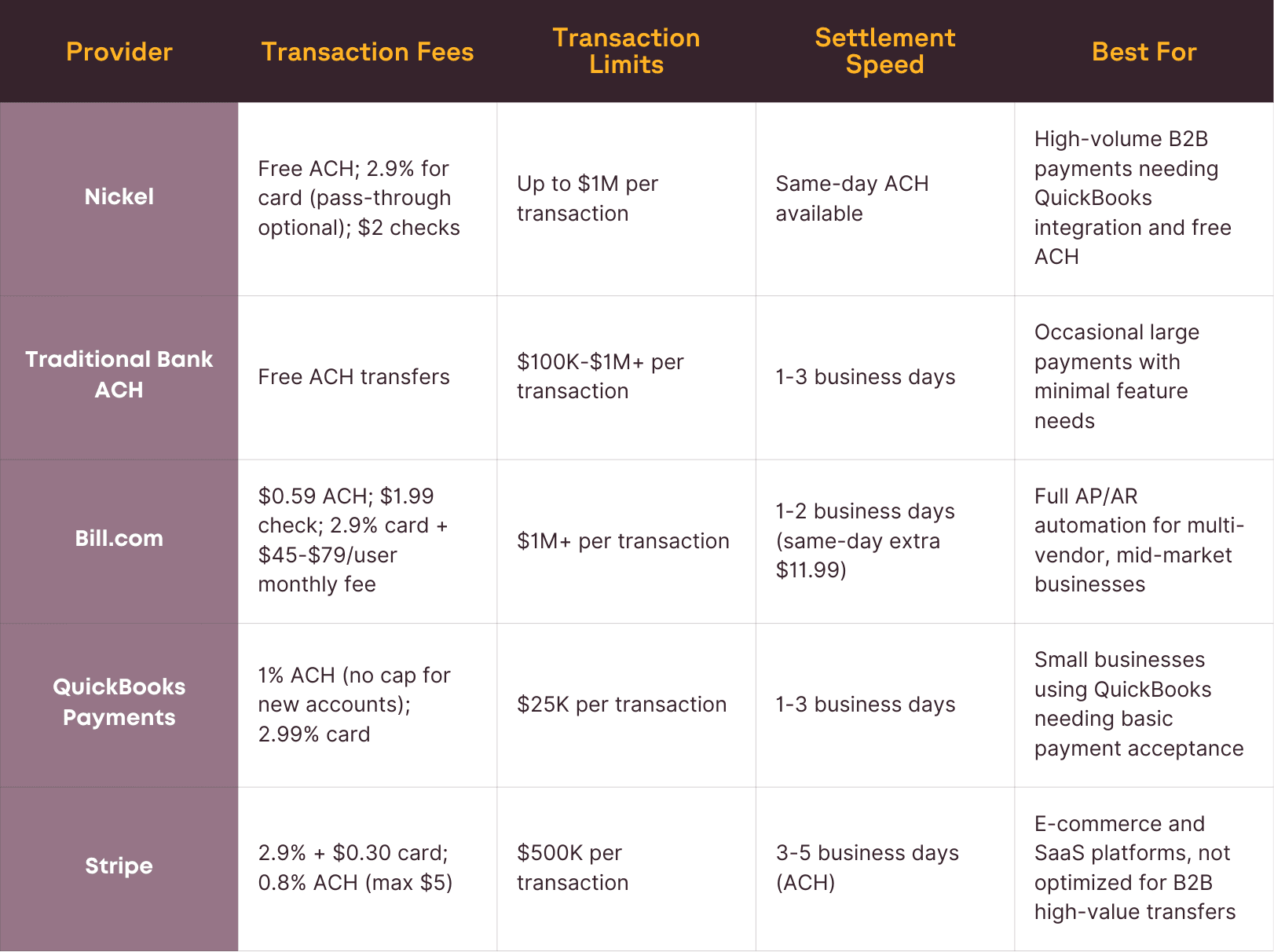
Note: Pricing accurate as of publication date. Always verify current rates with providers.
1. Nickel
Nickel has become the go-to solution for companies tired of paying retail-style fees on enterprise-sized transactions. Unlike processors built for consumer payments, Nickel is engineered specifically for B2B needs - wholesale distributors, contractors, and manufacturers moving hundreds of thousands each month finally get a platform built for them.
Let’s see why Nickel stands out.
Unlimited Free ACH Transfers
At the core of Nickel’s appeal is its unlimited free ACH model. There are no caps, subscription fees, or hidden conditions.
A company paying $500,000 per month in vendor invoices saves $5,000 monthly compared to 1% fee models like QuickBooks Payments.
That’s $60,000 back in your budget every year.
Even high-value transactions aren’t a problem. Nickel supports single payments up to $1 million, eliminating the frustrating need to split large invoices across multiple transactions.
Faster Settlements and Cash Flow Control
Timing matters in B2B payments. Nickel’s same-day ACH capabilities mean funds can land in your account within hours rather than days. For businesses managing cash flow tightly, or paying vendors on short timelines, this speed prevents late payment penalties and keeps relationships strong.
Nickel’s Net Terms Advance™ goes a step further by funding your invoices upfront while your customers take up to 60 days to pay. You receive up to 95% of the invoice immediately, risk-free, while Nickel handles collections in the background.
Integrated With QuickBooks
Nickel’s native QuickBooks Online integration removes one of the biggest pain points for finance teams: reconciliation.
Invoices and bills sync in real time, and every transaction matches your bank statements individually - no batch deposits, no CSV imports. The result is clean books, reduced manual entry, and fewer errors.
This integration extends to vendor and customer data too. New vendors can be onboarded directly from QuickBooks, payment details sync automatically, and recurring bills or invoices can be managed without leaving the platform.
Built for Industrial Use Cases
Nickel isn’t trying to be everything to everyone. It’s purpose-built for industries where transactions are large and relationships are long-term. Construction firms can route approvals for six-figure progress payments.
Wholesale distributors can extend net terms to loyal buyers without acting as a bank. Manufacturers can process incoming and outgoing payments on the same platform without juggling multiple tools.
Vendor Onboarding and AP Automation
Setting up new vendors is painless with Nickel’s branded onboarding portal. Vendors input their payment details directly, reducing back-and-forth emails and compliance risk.
Approval workflows ensure the right people sign off before funds are released, and recurring bills can be scheduled automatically to eliminate missed payments.
Flexible Payment Options
Nickel supports every major payment method - ACH, credit card, or check - and lets businesses decide who covers card processing fees. This flexibility gives finance teams control over costs and allows them to pass fees to customers when appropriate.
Check deposits are also digitized. Instead of bank runs and authorization forms, checks can be deposited in seconds, tracked in real time, and reconciled automatically.
Transparent Pricing and Support
Nickel’s pricing is refreshingly simple: free ACH, flat 2.9% credit card processing (with pass-through capabilities), and $2 check payments.
There are no tiers that penalize growth and no surprise markups. Support is equally transparent - real humans are available via chat or email to resolve payment issues fast.
With a 4.9-star G2 rating and trust from over 10,000 small and mid-sized businesses, Nickel consistently outranks competitors like Melio, QuickBooks Payments, and Forwardly for ease of use, cost savings, and reliability.
2. Traditional Bank
At first glance, bank ACH transfers seem like the obvious choice for large transactions. Most business banks let you send ACH payments for free, and their transaction limits are typically high enough to cover six-figure invoices. From a pure cost perspective, this sounds ideal.
The Upside: Cost and Predictable Limits
Banks rarely charge for outgoing ACH transfers, which makes them appealing for businesses processing high-value payments. Many allow individual transfers of $100,000 or more, so splitting transactions is rarely required. Settlement times are also predictable, typically one to three business days, giving finance teams clear expectations for when funds will land.
The Downside: Minimal Features and Manual Work
The tradeoff comes with functionality. Traditional bank ACH systems are bare-bones. They do not integrate natively with accounting tools like QuickBooks or ERPs, leaving finance teams stuck with manual data entry and time-consuming reconciliation.
There are no approval workflows, no vendor onboarding portals, and no detailed payment tracking - just basic transaction records.
For businesses managing dozens of large transactions every month, this lack of automation creates unnecessary overhead. Staff end up chasing down approvals, double-entering invoices, and spending hours matching bank statements to accounting records. The cost may be free on paper, but the inefficiency adds up quickly - a problem that Nickel does not suffer from.
3. Bill.com
Bill.com is one of the most recognizable names in accounts payable automation, especially for mid-market companies juggling multiple vendors and complex approval chains.
It packs in features like vendor management, approval workflows, two-way sync with top accounting platforms, and options for both domestic and international payments.
On paper, it looks like a powerhouse for managing high volumes of transactions. But when you examine the pricing structure against competitors like Nickel, the true cost for large transactions becomes impossible to ignore.
High Subscription Fees That Add Up Quickly
Bill.com’s pricing tiers start at $45 per user, per month for its Essentials plan and climb to $79 per user, per month for Corporate. Larger enterprises can expect custom pricing beyond this. For a finance team with five users, even the mid-tier plan quickly hits $275 per month before you pay a single transaction fee.
While those fees might feel justifiable for companies using every feature in the platform, they’re excessive for businesses that primarily need fast, cost-effective large payment processing. Nickel, in contrast, offers unlimited free ACH transfers and no mandatory monthly subscription, immediately eliminating this overhead.
Transaction Fees That Crush High-Value Payments
The real hit comes from Bill.com’s transaction fees. ACH transfers cost $0.59 each, while check payments run $1.99. That may seem low, but scale changes the math.
A company making 100 ACH payments per month is paying an additional $59 monthly in ACH fees alone, or roughly $700 per year, on top of subscription costs.
Credit card payments are even more expensive, carrying a 2.9% fee. On a $100,000 transaction, that’s $2,900 per payment - a painful margin hit compared to Nickel’s flat-free ACH model. Even “faster” ACH options, like Bill.com’s same-day processing, cost $11.99 per transfer.
By comparison, Nickel allows unlimited ACH transfers up to $1 million per transaction with no fees, dramatically reducing payment costs for businesses that process high-value invoices.
Good Features, but Overbuilt for Simple Needs
Bill.com shines in comprehensive AP management. Features like automatic two-way sync with QuickBooks, Xero, and NetSuite, detailed audit trails, and multi-level approval chains are valuable for companies managing hundreds of vendors or operating across multiple entities.
However, these same features make the platform feel heavy for businesses that simply need to move large amounts of money efficiently.
Many of Bill.com’s capabilities, such as its expense management and corporate card tools, go unused by companies focused solely on large B2B payments, yet those companies still shoulder the full subscription and transaction costs.
4. QuickBooks Payments
QuickBooks is a household name in accounting software, but its payment processing solution is a different story, especially if your business processes high-value B2B transactions. QuickBooks Payments may seem like a natural choice because it integrates directly with QuickBooks Online, but its fee structure punishes businesses moving large sums of money.
The 1% ACH Fee That Adds Up Fast
QuickBooks Payments charges 1% on every ACH transfer. For older accounts, that fee used to be capped at $10 per transaction, meaning a $200,000 transfer cost the same as a $1,000 transfer. That cap is gone. Now, if you receive a $200,000 payment, you’ll pay $2,000 in fees. A $400,000 transfer? That’s $4,000 gone instantly.
For companies that regularly move hundreds of thousands each month, these fees can snowball into tens of thousands of dollars annually. Nickel, on the other hand, offers unlimited free ACH transfers with no caps, instantly eliminating one of the biggest drains on profitability for large transactions.
Built for Small Businesses, Not High-Volume B2B
QuickBooks Payments was designed for small-business invoicing, not enterprise-scale B2B payments. It lacks advanced features like high transaction limits, net terms management, customizable approval workflows, and one-to-one reconciliation that growing companies need when managing hundreds of thousands in monthly payments.
For businesses processing high-dollar invoices, these gaps create operational headaches: splitting transactions to meet limits, manually reconciling batch deposits, and risking errors that ripple across financial reports.
5. Stripe
Stripe is the darling of startups and online marketplaces, but if your business processes large B2B payments, it can quietly gut your margins.
The platform’s 2.9% + $0.30 credit card fee looks manageable on small consumer transactions, but at B2B scale, it becomes unsustainable.
Add in fees for international cards, currency conversion, and ACH transfers, and Stripe quickly turns into one of the most expensive options on the market for high-value invoices.
The 2.9% Problem on Large Invoices
Stripe’s default pricing of 2.9% + $0.30 per card transaction might not sting on a $50 purchase. On a $50,000 B2B invoice, though, you’re handing over $1,450.30 in fees.
Process multiple six-figure payments every month and you’re burning tens of thousands of dollars annually - money that should be reinvested into growth, not lost to processing.
ACH isn’t much better. Stripe charges 0.8% per ACH transfer, capped at $5 per payment. That cap softens the blow but still means you’re paying $5 on every ACH transaction - while Nickel offers ACH completely free for both sending and receiving.
Built for E‑Commerce, Not B2B
Stripe’s strengths, including sleek APIs, multi-currency support, and hundreds of integrations, shine in consumer-facing e-commerce.
But B2B transactions have different requirements: net terms, approval workflows, partial payments, vendor management, and seamless ERP syncing. Stripe doesn’t natively deliver these capabilities, leaving businesses to patch together third-party add‑ons or settle for limited functionality.
Nickel, on the other hand, was designed around industrial B2B workflows from day one. It combines free ACH, pass-through credit card fees, QuickBooks-native integration, and real‑time reconciliation into a single platform purpose‑built for manufacturers, wholesalers, and construction companies.
Why Nickel Wins for Large Transactions
After comparing the top processors for high-value B2B payments, Nickel stands out as the clear winner.
It combines zero transaction fees, million-dollar payment limits, same-day ACH, and native QuickBooks integration into one platform built specifically for businesses moving serious money.
This is about cutting costs, reducing friction, and improving cash flow in ways traditional processors simply cannot match.
Massive Cost Savings
The financial difference is impossible to ignore. For example, a construction firm sending $1 million in vendor payments each month saves roughly $10,000 monthly compared to processors that charge 1% on ACH transfers.
Over five years, that’s $600,000 back into the business - money that can fund new projects, hire additional staff, or shore up reserves without touching credit lines.
No Splitting Large Payments
Nickel’s $1 million per-transaction limit allows even the largest invoices to be processed in one go.
Other processors cap transactions at $10,000 to $25,000, forcing businesses to split payments across multiple transfers. That creates unnecessary complexity, multiple reconciliation entries, and higher exposure to errors. Nickel removes this hassle entirely.
Same-Day ACH Keeps Cash Flow Moving
Large transactions can cripple cash flow if they sit in limbo for three to five business days. Nickel’s same-day ACH option dramatically shortens settlement times, freeing up working capital and improving vendor relationships.
Automatic QuickBooks Integration
For finance teams handling dozens of large payments per month, manual reconciliation is a nightmare.
Nickel solves this with native QuickBooks syncing and one-to-one settlement, ensuring every payment hits the right ledger automatically.
No CSV uploads. No manual matching. Just accurate books and hours of administrative work saved every month.
Built for B2B Payment Realities
Nickel isn’t repurposed consumer tech. It’s architected around the quirks of B2B: long payment cycles, multi-approver workflows, vendor onboarding, and high-value fraud monitoring.
Risk management systems understand six-figure transactions, so legitimate payments aren’t flagged or delayed unnecessarily. That means fewer phone calls to banks and fewer headaches for your team.
Get started with Nickel and save countless thousands every year.
Getting Started With Large Transaction Processing
Optimizing large transaction processing begins with understanding your costs and choosing a platform built for high-value B2B payments.
The transition to a better processor is typically straightforward and can be completed within a few weeks, but the key is selecting one that matches your transaction patterns rather than forcing enterprise-scale payments through systems meant for small consumer purchases.
Calculate Your True Processing Costs
Begin by mapping out your current expenses for large transactions over a typical month. Include:
- Transaction fees, such as percentage-based charges or per-transfer costs
- Subscription or platform fees tied to your current processor
- Operational costs created by manual work, payment splitting, or reconciliation delays
This analysis gives you a baseline for measuring potential savings from a switch. For example, a company processing $500,000 in monthly ACH payments at 1% fees is losing $5,000 every month.
Analyze Your Transaction Patterns
Next, look closely at your payment behavior. What is the average size of your large transactions? How many high-value payments do you process each month?
Are same-day settlements critical to maintaining cash flow? These answers determine which features, like $1 million per-transaction limits, same-day ACH, or multi-approver workflows, are essential rather than optional.
Factor in System Integration and Workflows
Finally, evaluate integration with your existing accounting or ERP systems. If your team runs QuickBooks Online, a processor with native syncing can eliminate manual entry and prevent costly reconciliation errors.
For businesses with multiple stakeholders involved in approvals, make sure the platform supports tiered permissions and approval routing so payments stay secure without slowing down operations.
The Bottom Line on Large Transaction Processing
Large B2B transactions demand more than just basic payment tools. They require processors that can handle six-figure transfers without draining profit through fees or slowing cash flow with lengthy settlement times.
Nickel meets this challenge head‑on with unlimited free ACH transfers, $1 million per‑transaction limits, same‑day ACH, and native QuickBooks integration.
For companies processing large transactions, these features translate directly into saved time, simplified operations, and significant cost reductions.
By switching to Nickel, companies not only avoid unnecessary fees but also gain the flexibility and control needed to manage high‑value payments with confidence. Start using Nickel to protect your margins and keep your cash moving at the speed your business demands.
Ready to eliminate fees on large transactions? Get started with Nickel’s free ACH processing and see how much you can save on your next large payment.
FAQs
How Does Nickel Handle Fraud Protection on Large Transactions?
Nickel’s fraud detection is tuned for B2B patterns, which reduces false flags on legitimate high-value payments. The platform monitors transaction size, vendor history, and timing to identify risks without slowing down cash flow. This approach is more reliable than consumer-grade systems that often trigger unnecessary holds on six-figure payments.
Can Nickel Process Both Incoming and Outgoing Payments?
Yes. Nickel supports inbound payments from customers and outbound payments to vendors on the same platform. This eliminates the need to manage separate systems for payables and receivables and simplifies cash flow visibility by consolidating all large transactions in one dashboard.
What Industries Benefit Most from Nickel’s Free ACH Model?
Industries that regularly process high-value payments, like construction, manufacturing, and wholesale distribution, see the greatest savings. A manufacturer paying $1 million in monthly invoices, for example, avoids $10,000 in fees every month compared to platforms charging 1% per ACH transfer.
How Quickly Can a Business Transition to Nickel?
Most businesses can set up Nickel in days and fully transition in one to two weeks. The QuickBooks integration accelerates onboarding, and branded vendor portals allow suppliers to enter payment details directly, reducing administrative workload during the switch.
Does Nickel Support Multi-User Approval Workflows?
Yes. Nickel lets businesses configure tiered permissions and multi-approver workflows, ensuring large payments are reviewed by the right stakeholders without slowing operations. This feature is critical for construction firms and distributors managing six-figure progress payments and vendor invoices.


